





The product's shade and actual color may differ from what is shown in the picture, as the images are for illustrative purposes. The product description is general and may not include all the product's features.
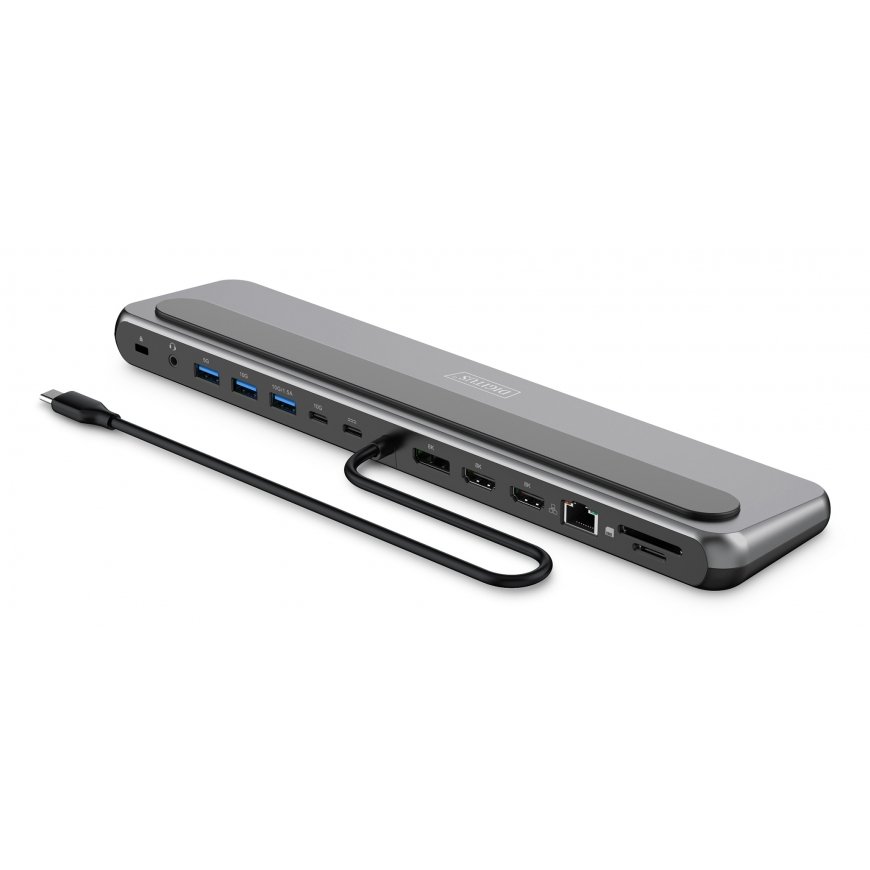
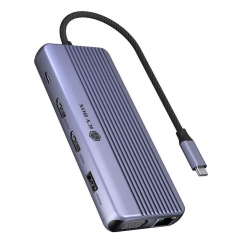
Digitus USB-C 8K docking station, 12-port
129,00 €
Monthly payment from 4.22 €
3879384 DA-70919
4016032502098
2026-04-06
 Pay 5x25.80€
You are interested in this product?
- 2x HDMI port + 1x DP port (8K/30Hz) - Expand your workstation with up to 3 external monitors
- Supports dual monitor (2x 4K/60Hz) & triple monitor (1x 4K/60Hz + 2x 4K/30Hz) in MST mode (Multi Stream Transport / extend screen) - Windows, ChromeOS
- 2x USB-A 3.2 Gen 2 (10 Gbit/s) connection for ultra-fast data transfer - one port with additional charging function (1.5A) for mobile devices
- 1x USB-A 3.2 Gen 1 (5Gbit/s) port for fast data transfer
- 1x USB-C 3.2 Gen 2 (10 Gbit/s) port for ultra-fast data transfer and charging function (1.5A) for mobile devices
- 1x Gigabit Ethernet connection 10/100/1000 Mbit/s (RJ45) - connection of your notebook to the network via cable
- 2x card reader (SD/MicroSD) - transfer speed of 104 MBps
- 1x 3.5 mm audio jack
- 1x USB-C Power Delivery (3.0) port for charging the notebook
- Rubberized feet and support - perfect for a secure stand without slipping
Expand your workplace with our powerful USB-C 8K docking station and enjoy brilliant image quality. When connecting a single monitor, a resolution of up to 8K/30Hz is supported. When using two or three monitors on the docking station, a resolution of up to 4K/60Hz is achieved. The docking station supports both dual monitor mode (2x 4K/60Hz) and triple monitor mode (3x 4K/60Hz) in SST mode (screen mirroring) and (1x 4K/60Hz + 2x 4K/30Hz) in MST mode (screen extending). With two USB-A 3.2 Gen 2 (10 Gbit/s), one USB-C 3.2 Gen 2 (10 Gbit/s) and one USB-A 3.2 Gen 1 (5 Gbit/s), you can transfer data at lightning speed. Two ports also offer a charging function (1.5A) for mobile devices. The Gigabit Ethernet port (RJ45) ensures a stable network connection, while the SD & MicroSD card reader (104 MB/s) enables fast file transfers. The docking station is powered via the USB-C Power Delivery port. Simply connect your own USB-C charger (at least 100 W) – this is located to the right of the 10 Gbit/s USB-C port. The dock automatically distributes the power: up to 85 W is supplied to your notebook, and the remaining 15 W is used by the docking station for its own operation. This ensures that your laptop remains reliably charged even when in full use. Rubberized feet and the non-slip pad provide stable support for both your notebook and the docking station. Connect all your devices with just one cable - for a tidy and productive working environment.
Design | |
| Product colour | Black, Grey |
Operational conditions | |
| Operating temperature (T-T) | 0 - 35 °C |
Weight & dimensions | |
| Weight | 450 g |
| Width | 73 mm |
| Depth | 300 mm |
| Height | 20 mm |
Packaging data | |
| Package weight | 450 g |
| Package height | 22 mm |
| Package width | 300 mm |
| Package depth | 73 mm |
Logistics data | |
| Quantity per pack | 1 pc(s) |
Packaging content | |
| USB cable length | 0.35 m |
30 other products in the same category:



 169,00 € 139,00 €AVAILABLE Shipping 10-14 b.d.
 219,00 € 159,00 €AVAILABLE Shipping 10-14 b.d.
 269,01 € 259,01 €AVAILABLE Shipping 4-6 w.d.

 129,00 € 119,00 €AVAILABLE Shipping 4-6 w.d.





 209,00 € 169,00 €AVAILABLE Shipping 5-6 b.d.
 149,00 € 139,00 €AVAILABLE Shipping 5-6 b.d.
 178,99 € 168,99 €AVAILABLE Shipping 5-6 b.d.



© 2026 Frogest OÜ. All right reserved.


