



The product's shade and actual color may differ from what is shown in the picture, as the images are for illustrative purposes. The product description is general and may not include all the product's features.
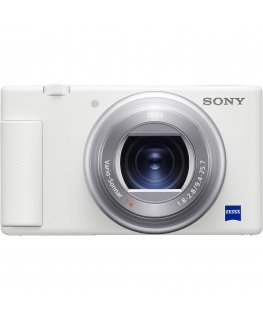
Sony ZV-E10 (White)
1818787Shipping 14-16 b.d.
 Pay 5x157.80€
Sony ZV-E10
Extensive and dynamic records
The wide-angle lens makes it easy to take dynamic shots that highlight both you and where you are. Capture more of the city in a natural backdrop and take viewers on a journey with you.
An eye-catching background
A fixed focal length smoothly and naturally blurs the background and makes the subject stand out. This type of lens creates a smooth, natural background cast that accentuates the subject. It's also useful if you need a sharper image in low-light environments.
Close-up photography emphasizes details
Unlike other types of lenses, a macro lens allows you to get closer to your subject and capture finer details at a larger size than with a normal lens. Whether you want to capture an accessory or a dish being cooked, a macro lens can bring your subject close to reveal the most beautiful details.
Action from a distance
With a telephoto lens, you can shoot distant objects, landscapes or action in sharp detail, whether you're creating a travel blog post or observing the day-to-day. Zooming in or zooming out can also provide additional dynamism.
Enhance blogs with over 60 lenses
Sony's range of lenses can add an extra dimension to blogging with the ZV-E10. Sony offers more than 60 lenses designed for Sony cameras, including those adapted for film. Choose from a unique lens offering and explore the power of expression.
Advantages of Sony lenses for video
Discover the four unique advantages of Sony's E-mount lenses for film. Sony's combination of lenses and cameras expands your video production possibilities.
Learn more about Sony's E-mount
Easy visual blogs
One touch background blur control
No complicated manual adjustments, just press one button to turn bokeh on or off. Choose Defocus to professionally blur the background and draw attention to the main subject, or Clear to keep the entire scene in sharp focus.
Add drama by slowing down and speeding up2
By pressing the ZV-E10's "Photos/Movies/Slow & Fast Motion" button, you can easily access the slow motion and fast motion modes to shoot slow motion images2 in 4k. slower than real time3 4. Alternatively, you can change the setting and shoot time-lapse images2 4 up to 60k. faster. These images don't need to be edited on a computer, and feature crisp Full-HD quality.
Ideal for product review posts
Take the frustration out of recording product reviews When you turn on the Product Demo setting, the camera quickly and automatically switches focus from your face to the product in front of the device, so you don't have to switch between focusing while waving your hand around the product.
Natural and soft skin tones
Even without special settings, the ZV-E10 will capture the natural tone of your skin. In addition, you can use the skin softening effect, which you can adjust depending on the strength according to the following criteria: OFF / low / medium / high5.
High-quality videos even when you're on the move
The ZV-E10's image stabilization system enables smooth and clear shooting even while walking6. Another feature, Face-Priority Auto Exposure (AE), automatically highlights face lighting. Even as you walk, it automatically detects your face and adjusts to keep it brightly lit as you transition from indoors to outdoors, from sunshine to shade.
Automatic, precise focus
Without special settings, the ZV-E10 can automatically track your face and eyes to focus stably and avoid straying to other subjects. If you want to move the focus, simply touch the LCD monitor and the camera will follow the subject you select with AI-powered7 real-time tracking8.
Smooth, professional focus transition
The ZV-E10's focus speed can be adjusted to suit your mood or for a more dramatic image. The camera allows you to choose from seven different speeds9, from fast transitions to slower transitions. Get inspiration on how to use them in the video below.
A handle for more convenient blogging
The optional GP-VPT2BT10 makes it easier to take selfies and from high up or down low. You can also find the controls on the grip, so you don't have to reach for the camera buttons when shooting. You can use the controls to start or stop recording, control zoom, and set defocus for bokeh or a sharp image.
Filming with a large sensor
A larger sensor produces higher quality
The ZV-E10's impressive images are created by a large APS-C size image sensor, the same as that used even in professional cinema cameras. This sensor is more than ten times larger11 than that used in conventional smartphones, so it collects much more light and image data to create attractive images and stunning bokeh effects.
[1]APS-C [2] 1.0 type [3] 1/2.3~1/3.4 type
Professional looking bokeh effect
With the ZV-E10, you can easily capture impressive images with softly blurred backgrounds, just like in the movies. Thanks to the huge camera sensor, you will be able to capture stunning shots where the subject stands out clearly against the background.
Stunning 4K movies12
Filming in high 4K resolution12 is super easy: press the MOVIE (movie) button13 and the ZV-E10's large image sensor will turn on a fascinating range of colors. At maximum resolution, the sensor records 2.4k.14 data rather than the required 4K12, then compresses it to produce the final record.
The material is clearly captured in twilight
Even in poorly lit areas, the ZV-E10 delivers detailed images with almost no noise. As we already mentioned, this is due to the large image sensor of the camera, which collects even more light. The result is clear images, even when shooting in poorly lit rooms or outdoors at night.
For stunningly clear sound
Designed for clear voice recordings
The ZV-E10 makes recording your voice simple and hassle-free. The internal directional 3-capsule microphone is optimized to capture sounds in front of the camera, so your voice will be recorded clearly even in a crowd.
Sound is recorded clearly even when the wind blows outside
The ZV-E10 is sold with a wind shield that reduces audible wind noise when shooting outdoors. Just attach the wind screen and you won't have to adjust the noise level after shooting.
For even higher sound quality
Unlike conventional analog audio transmission, you won't have to worry about cable signal interference. Pair the ZV-E10 with any microphone that supports Sony's digital audio interface via the Multi Interface (MI) connector for clear, low-noise digital sound.
Share and connect
Easy remote connectivity with high quality images
The ZV-E10 can be used as an online communication tool, live streaming camera15, taking advantage of the large sensor and built-in microphone. To use the ZV-E10 as an external camera15, connect it to a computer16 or Sony Xperia™ smartphone17 via the USB Type-C® wired connection.
Film and share instantly
Share professional-quality videos on social media soon after filming. The free Imaging Edge Mobile™18 software lets you quickly transfer recordings or photos from the ZV-E10 to your smartphone19.
Vertical shooting20 without any hassle
Vertical footage20 can be played back or edited by automatically marking their vertical orientation21 so you can upload content tailored for smartphone screens.
Easy recording editing on your smartphone
The "Movie Edit"18 app allows you to conveniently edit videos on your smartphone. Apply improved stabilization to shaky footage22 or reframe/crop videos to fit social media formats.
Hassle-free power supply
You don't have to worry about the power supply when you're vlogging, the ZV-E10 has several power supply options for worry-free photography and video.
Power that is sufficient even for shooting outdoors
ZV-E10 battery lasts for 125 minutes. for continuous shooting or 440 photos23, so you can feel comfortable during long outdoor photo sessions.
External power supply for longer photo sessions
The camera supports external power via the USB Type-C® connector, so you can record longer and work more flexibly with external mobile batteries.
Select change current catering at for broadcasting
With access to an AC power source, you can use the AC-PW20AM10 AC Adapter and never worry about running out of battery power during a live broadcast.
Add drama to your blog
Add artistic effects with your camera
You can edit colors and create various artistic effects. Simply change the creative style setting or choose from seven to 24 different video effects using video effect modes.
S-Log325 support for artistic color tones
The ZV-E10 features S-Log325, used in other high-end Alpha series cameras, for more creative color tones. When editing on a computer, S-Log325 allows for greater control over final colors with a wide dynamic range.
Live lifelike 4K HDR movies with the HLG26
The ZV-E10 lets you shoot 4K HDR (High Dynamic Range) movies in true-to-life, natural colors without the need for complex editing or color correction26.
More about ZV-E10
Imaging Edge DesktopTM for remote control from a PC
Enhance your images with Imaging Edge Desktop18 software, which lets you control and monitor your footage directly from your computer screen, manage and edit photos.
More about Imaging Edge Desktop
Enjoy video chats on the big BRAVIA screen
Communicate with friends and family on the big screen by connecting the camera to your BRAVIA TV27.













© 2026 Frogest OÜ. All right reserved.


